Local & Confidential Processing
Your raw footage never uploads to third-party servers. Suitable for confidential client projects, agency workflows, and videos covered by NDAs.
LOOKING FOR A GLING ALTERNATIVE?
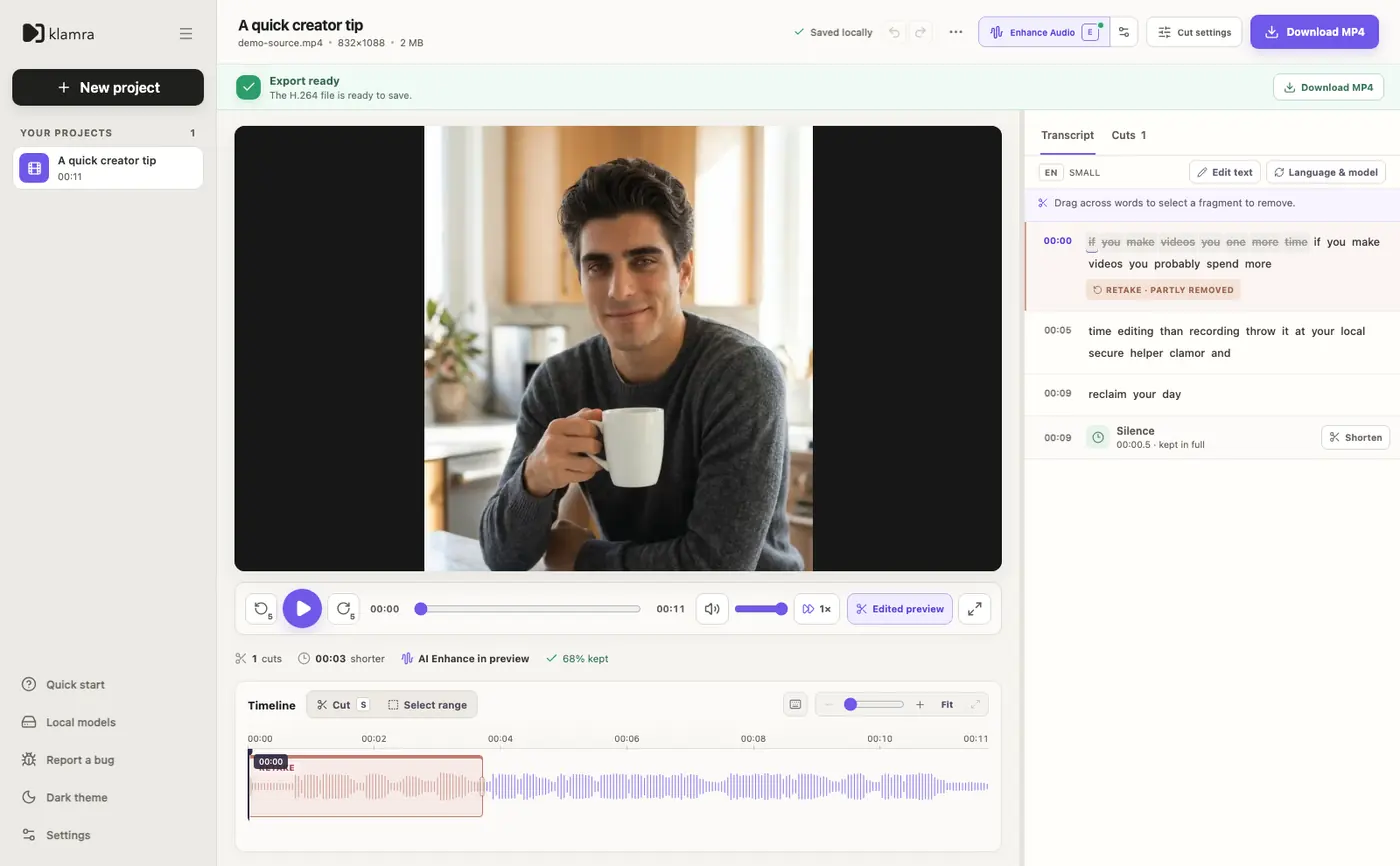
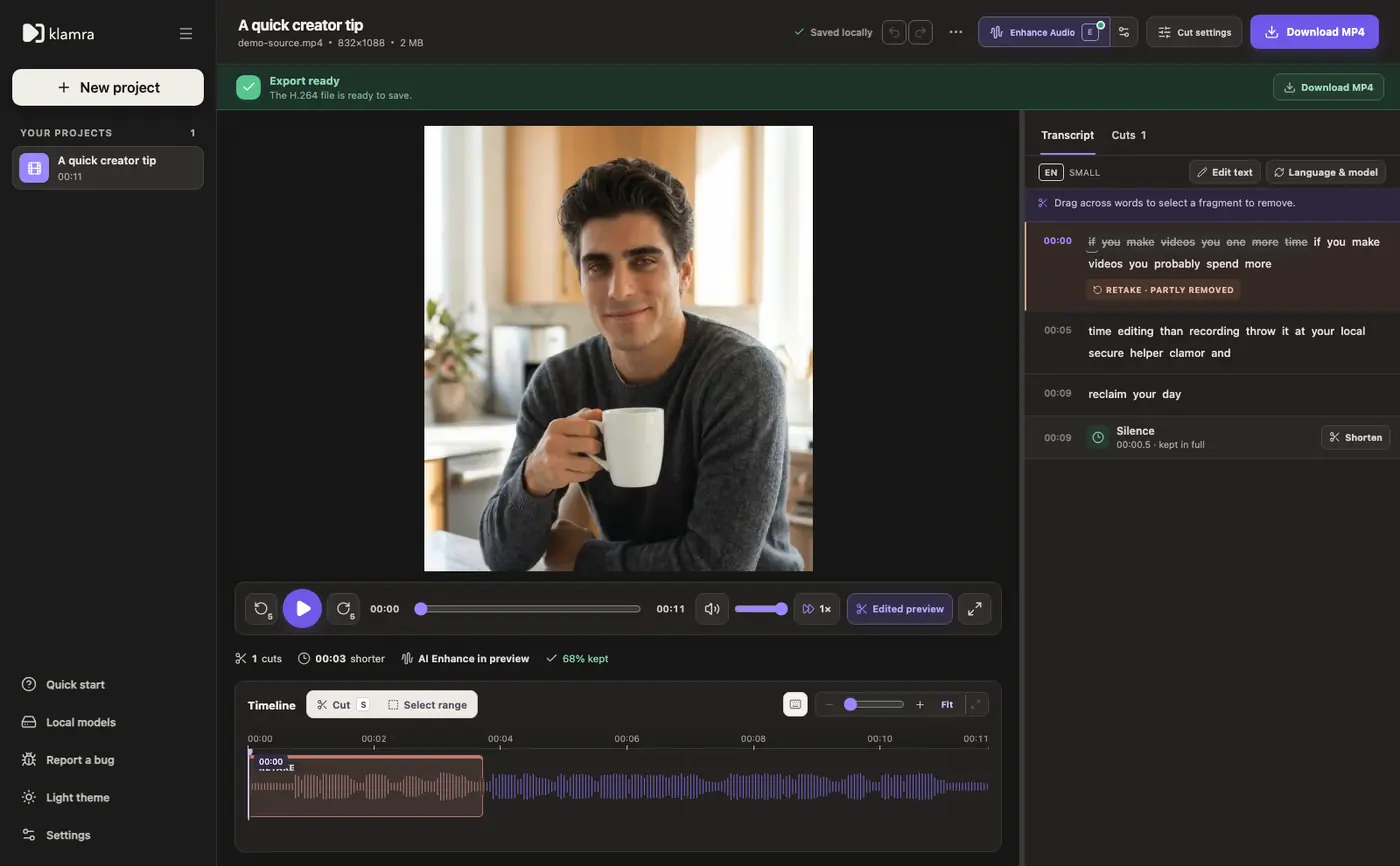
Cut silences, review suggested retakes, and edit through the transcript. Your footage is processed locally on your Mac.
BUILT FOR MAC CREATORS
Process talking-head media directly on your Apple Silicon hardware without uploading your unreleased footage to remote servers.
Your raw footage never uploads to third-party servers. Suitable for confidential client projects, agency workflows, and videos covered by NDAs.
Skip uploading large 4K camera files to remote servers. Klamra reads files directly from your Mac’s storage so you can start cutting immediately.
Klamra supports video (MP4, MOV) as well as standalone audio (MP3, WAV, M4A). Trim pauses, cut false starts, and clean spoken audio tracks.
Built-in MossFormer2 48 kHz Pure Voice processing helps suppress room reverberation and background noise while preserving natural vocal clarity.
Suggested cuts for silences and repeated takes are displayed on the transcript and timeline. Nudge cut boundaries frame-by-frame or restore any section with a click.
After downloading required speech models during initial setup, core editing and rendering operate locally without requiring continuous internet access.
ARCHITECTURAL COMPARISON
An objective comparison of local-first on-device processing versus cloud-based editing workflows.
| Dimension | Klamra (Local-First) | Cloud Editors (e.g. Gling) |
|---|---|---|
| Processing ArchitectureKlamra runs speech AI and video rendering locally on your Mac rather than uploading to remote servers. | ✓ Local on Apple Silicon (M1–M4) | Cloud servers (media uploaded over internet) |
| Footage Privacy & StorageProtects confidential client work, pre-release media, and corporate videos subject to NDAs. | ✓ Zero remote upload; files remain on your Mac | Raw video stored on third-party cloud infrastructure |
| Import Bandwidth & File HandlingNo waiting for gigabytes of high-bitrate 4K footage to upload before editing begins. | ✓ Reads directly from local storage | Requires uploading full camera files over the internet |
| Platform SpecializationTailored specifically for macOS unified memory architecture and Metal GPU acceleration. | ✓ Native macOS app for Apple Silicon (macOS 14+) | Cross-platform desktop apps with cloud backend |
| Offline CapabilityInternet is required for initial model download, license/trial checks, and updates; editing works locally once ready. | ✓ Edits locally with cached models | Requires continuous internet for cloud analysis |
| Free Trial ModelA one-time 120-minute allocation on unique media to evaluate real recordings, not a recurring monthly free tier. | ✓ 120 minutes one-time footage limit, no credit card | Limited initial allocation or upfront payment details |
* Factual comparison based on publicly available documentation on gling.ai as of September 2026. Gling also supports manual text/timeline editing, audio files, and noise removal; the architectural difference lies in cloud versus local on-device processing.
REAL RESULT
Watch Klamra trim an awkward pause and remove a false start on a single talking-head take.
Sample in English
Duration: 11.7 s
Original take with false start, awkward silence, and background room tone.
Original take with false start, awkward silence, and background room tone.
Duration: 8 s
Bad take cut automatically, silences trimmed, voice leveled and cleaned.
Bad take cut automatically, silences trimmed, voice leveled and cleaned.
EARLY ACCESS PRICING
Try every feature on 120 minutes of media. No credit card is required to start. The trial is one-time and measured by the duration of unique files accepted for processing.
Early Access monthly plan with maximum flexibility and cancellation at any time.
Early Access annual plan. The lowest monthly cost and a full year of uninterrupted editing.
Early Access Offer: This preferential pricing is available during the Early Access window. Any active subscription retains this rate for future renewals. The planned regular price for the full release will be higher.
Payments, tax compliance, and subscriptions are handled securely by Stripe. You will see the final amount, applicable taxes, and cancellation terms before purchase in the app.
FREQUENTLY ASKED QUESTIONS
Everything you need to know about local processing, trial limits, and hardware requirements.
Both tools help creators cut filler silences and repeated takes from talking-head recordings. The primary difference is architecture: Gling uploads media to cloud servers for transcription and cut generation. Klamra runs speech models and video processing locally on your Apple Silicon Mac, so your raw files never leave your computer.
Klamra requires an Apple Silicon Mac (M1, M2, M3, or M4 chip) running macOS 14 (Sonoma) or newer. It is built natively for macOS and utilizes local Metal GPU acceleration.
Footage processing and transcription run locally on your Mac. An active internet connection is needed to download initial Whisper models, check trial or subscription license validity, and receive signed application updates. Once models are downloaded and permissions are verified, core editing functions offline.
You receive 120 minutes of total processed unique footage. All editing features, silence cuts, retake review, and exports are unlocked. This is a one-time trial allocation to test real recordings before purchasing, not an automatically renewing monthly free tier. No credit card is required.
Yes. Klamra supports standalone audio files including MP3, WAV, and M4A. You can transcribe speech, cut hesitations and false starts, apply Pure Voice speech enhancement, and export a clean audio master.
No automated tool produces flawless results on every recording. Klamra highlights silence gaps and suggests retakes based on transcript analysis, but keeps you in full creative control: you can inspect each cut boundary on the magnetic timeline, review suggested retakes, and restore any segment with a single click.
120 MINUTES TRIAL · APPLE SILICON
Download Klamra to cut silences and review retakes locally. 120 minutes of free one-time processing on unique footage.
Download for macOS ↓macOS 14+ · Apple Silicon (M1/M2/M3/M4) · One-time trial, no credit card required